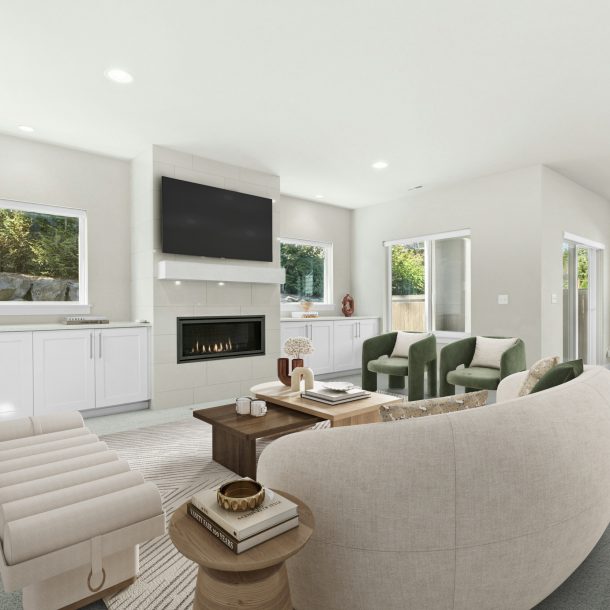
Virtual Staging Disclosure That Builds Trust: A Complete Playbook for Agents and Sellers
January 19, 2026
Virtual staging disclosure is more than a checkbox. It is how you set honest expectations, follow MLS and truth-in-advertising standards, and keep buyers engaged. When your listing clearly marks virtually staged images and repeats that message wherever the photo appears, you protect your brand and reduce friction during showings.
In this guide you will learn:
What qualifies as virtual staging, and what becomes misrepresentation.
Where to disclose on every channel buyers use.
How to label images so the note is visible on mobile and in thumbnails.
Ready-to-use phrases, seller and buyer scripts, and a quality checklist.
A simple workflow for teams and vendors so disclosure never gets lost.
1) First principles: what virtual staging is, and where the boundary sits
Virtual staging is a cosmetic digital enhancement that does not alter the property in real life. Examples: furniture, rugs, lamps, wall art, balanced white point, a mild twilight ambiance. The goal is to help a buyer read the layout and imagine scale.
Edits that change the space itself cross the line. Do not remove cracks or stains, do not swap flooring or ceilings, do not add or move windows and doors, do not invent a view, and do not stretch a room. Those changes mislead buyers and undermine the listing.
Short rule: improve mood and legibility. Do not modify architecture or facts.
2) Why disclosure helps conversion, not just compliance
Expectation setting. Buyers arrive at the showing already aware that furniture is digital. Fewer “gotcha” moments, more real conversation.
Reputation. Clear labels signal professional standards. Reviewers and colleagues notice.
Efficiency. You avoid re-exports and “please relabel” loops when images are reused on portals and social.
Search visibility. Consistent phrases like virtually staged and virtual staging disclosure in captions and alt text create a clean metadata trail.
3) Where disclosure lives: make the note travel with the image
Treat each photo like an asset that may appear in many places. Your disclosure should follow it everywhere a buyer might see it.
MLS gallery and captions. Add a visible note on the image or in the caption.
Public remarks. Mention virtual staging near the beginning.
Brokerage site and listing portals. Keep the same wording as MLS.
Social posts and ads. Do not crop labels out. Repeat the phrase in the post copy.
Email flyers and brochures. Include one clear sentence in the body text.
Open houses and appointments. If you display tablets or printed slides, say it out loud.
4) How to label images so buyers actually notice
Put a small, readable label in the bottom left or bottom right corner.
Use a neutral font and color with enough contrast.
Check the “thumbnail test.” The label should remain legible on small previews.
Keep the wording identical across platforms. Consistency beats creativity here.
Store the unedited original next to the staged version for every angle.
5) Copy you can paste today
These lines are short, clear, and easy to standardize across systems.
On the photo or in the caption Image virtually staged for visualization.
In public remarks or marketing copy Some images are virtually staged. No structural changes are depicted.
For a brochure, website, or email Virtual staging illustrates possible furnishings. The property is vacant or unfurnished.
6) The storytelling advantage of before and after
A paired set speaks for you. The “before” confirms reality. The “after” shows potential. Place them side by side, and add a small note: Furniture is digital. Layout unchanged. Buyers understand both the truth and the vision in one glance.
7) Platform specifics: what to check before you publish
MLS. Use the photo description or caption field where available. If your board supports a disclosure field in remarks, add it in the first lines.
Portals. Confirm that image compression does not blur your label. Re-upload if needed.
Instagram, Facebook, Pinterest. Crop responsibly. Keep the label visible. Repeat the phrase in the post copy and alt text.
Email platforms. Add the sentence under the hero image, not only in fine print.
Print. For flyers and handouts, include the one-line disclosure in the image caption.
8) Workflows that keep teams aligned
Pre-production:
Decide which rooms need virtual staging and which remain natural.
Share a short note with your vendor: style, buyer profile, disclosure phrase, and where the label should sit.
Create a folder structure for each room: original, staged, before_after.
Production:
Check scale and perspective before sending for final export.
Confirm the label is in place and readable on mobile.
Export two sets: MLS-ready and social-ready.
Post-publish:
If the listing status changes or you swap images, verify that disclosure is still present.
Keep a log of versions with dates. Save both originals and exports.
9) Quality guardrails for realistic staging
Furniture size should match the room’s true dimensions.
Light direction and shadows must agree with the windows in the photo.
Wall art and rugs should sit square with perspective lines.
Avoid glossy reflections that a real room would not create.
Use palettes that fit the property’s level: entry, mid-market, or luxury.
10) Frequent pitfalls and how to fix them
Unlabeled reposts. Solution: export a social version with the label baked in; never post a clean copy of a staged frame.
Caption drift. Solution: standardize one sentence and paste it everywhere.
Over-editing. Solution: ask for a realism pass. If you notice tiny furniture or wild skies, request corrections before publishing.
Lost originals. Solution: keep a mirrored cloud folder with the raw set, the staged set, and a shared log
11) Scripts you can use with sellers and buyers
Explain to a seller (email or text): We’ll present the home with digital furniture so buyers can understand the layout. Each edited image will carry a small label and the listing description will note that some images are virtually staged. This keeps the marketing beautiful and transparent.
Explain to a buyer during a showing: You’ll see several images furnished digitally to show scale. The layout is unchanged. We included the original photos in the gallery for reference.
12) One-page checklist
Before editing:
Plan cosmetic changes only.
Save unedited photos for every angle.
Confirm the disclosure phrase and label placement.
While editing:
Keep scale, perspective, and light realistic.
Do not remove defects. Do not add or move windows, doors, fixtures, or views.
Export with a readable label.
After editing:
Add the note to public remarks and marketing copy.
Test thumbnails on mobile.
Pair each staged room with a before and after where possible.
After publishing:
Recheck disclosure when status or images change.
Keep versions and timestamps until closing or per brokerage policy.
13) How Just Staging makes disclosure effortless
We deliver MLS-ready and social-ready files with consistent wording, visible labels, and organized folders. Each order includes a before and after set on request. If you need help selecting scenes or choosing a style for your buyer profile, our designers will prepare a plan that reads clearly online and in person.
Need compliant, realistic virtual staging for your next listing? Send the photos and the target buyer type. We will return a labeled, polished package that buyers understand and agents trust.